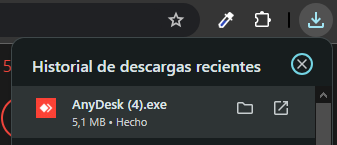
Después de darle al botón de descargar, busca la descarga en tu PC. Si utilizas Google Chrome, te saldrá un icono como el de la imagen, arriba a la derecha. Pulsalo para abrirlo.
Una vez abierto te pedirá permisos, pulsa en Ejecutar. SI FUERA NECESARIO, tendrás que volver a pulsar en ejecutar 2 veces.
Una vez abierto el programa, para poder realizar la conexión remota, me tendrás que facilitar la númeración donde indica, este puesto de trabajo.
Limpieza de virus, troyanos o malware.
Mejorar velocidad del arranque o del sistema.
Reparar errores de windows.
Mejora de velocidad del PC
Instalación de programas
Configurar dispositivos ( impresora, escaner, cam … etc )
Ayuda hacer tramites en páginas oficiales.
Resolver problemas con tu correo o outook.
Copias de seguridad de tus datos.
| Cookie | Duración | Descripción |
|---|---|---|
| cookielawinfo-checkbox-analytics | 11 months | This cookie is set by GDPR Cookie Consent plugin. The cookie is used to store the user consent for the cookies in the category "Analytics". |
| cookielawinfo-checkbox-functional | 11 months | The cookie is set by GDPR cookie consent to record the user consent for the cookies in the category "Functional". |
| cookielawinfo-checkbox-necessary | 11 months | This cookie is set by GDPR Cookie Consent plugin. The cookies is used to store the user consent for the cookies in the category "Necessary". |
| cookielawinfo-checkbox-others | 11 months | This cookie is set by GDPR Cookie Consent plugin. The cookie is used to store the user consent for the cookies in the category "Other. |
| cookielawinfo-checkbox-performance | 11 months | This cookie is set by GDPR Cookie Consent plugin. The cookie is used to store the user consent for the cookies in the category "Performance". |
| viewed_cookie_policy | 11 months | The cookie is set by the GDPR Cookie Consent plugin and is used to store whether or not user has consented to the use of cookies. It does not store any personal data. |